
DriveMate Meter -SPEED METER-2.6.2 - App Store
You'll be able to see results in few seconds.
Publisher Description


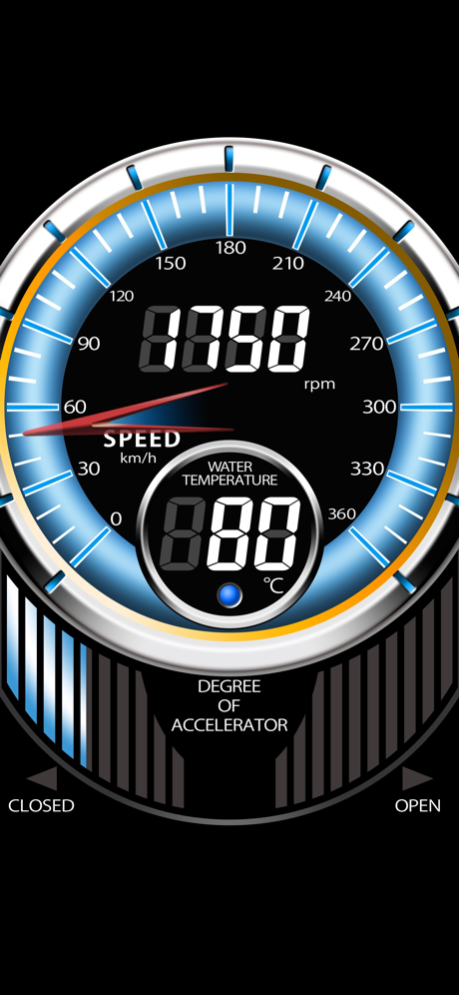
◎Your smartphone changes to the Speed Meter!
◎Using our OBD adapter (DX500 DriveMate Connect or DX501 DriveMate d-OBD), Engine RPM, Water temperature and more of your car can be displayed on your smartphone! (The products are sold separately. These products are sold / for use only in Japan)
-----------------------------
About the App
-----------------------------
This app displays current speed using GPS of your smartphone.
Linking with the OBD adapter (DX500 DriveMate Connect or DX501 DriveMate d-OBD), you can get additional information of your car, such as Engine speed, Water temperature, Vehicle speed and so on!
-----------------------------
Function Detail
-----------------------------
◆Speed Meter
Display the Speed of your device in real time.
This function is available with the app itself.
◆Linking with OBD adapter
With the OBD adapter (DX500 DriveMate Connect or DX501 DriveMate d-OBD), you can display following information.
-Tachometer (Engine RPM)
-Speedmeter (max: 180km/h)
-Speedmeter (max: 360km/h)
-Water temperature
-Accelerator opening degree
- Measuring 0-100km/h time
- Measuring 0-400m time
◆Warning Alert
Shows warning alerts when you go over your set value.
-------------------------------------
About DX500, DX501
-------------------------------------
DX500 DriveMate Connect and DX501 DriveMate d-OBD are OBD adapter by CARMATE to display information of your car to your smartphone.
For more information: https://www.drivemate.jp/product/
※When you use DX500, be sure to set your vehicle data by using the app "DX500 setting" (free app).
(DX500 and DX501 are sold / for use only in Japan)
-------------------------------------
Caution
-------------------------------------
※The speed in this app may differ from the vehicle's meter speed because speed of the vehicle's meter is corrected value and may cause error up to 10 percent.
※It is unable to use the Internet while iPhone connecting with DX500.
※We recommend turning off Bluetooth when using DX500 for connection stability.
※We recommend shutting off background apps for stability improvement.
※When the app is on background, it is unable to get information.
※Some vehicle models can't be getting all information using OBD adapter.
※If you mount your smartphone on your car, do not mount on a place which interfere airbag system or your driving.
Sep 28, 2022
Version 2.6.2
* Updated Privacy Policy URL
About DriveMate Meter -SPEED METER-
The company that develops DriveMate Meter -SPEED METER- is CARMATE. The latest version released by its developer is 2.6.2.
To install DriveMate Meter -SPEED METER- on your iOS device, just click the green Continue To App button above to start the installation process. The app is listed on our website since 2022-09-28 and was downloaded 0 times. We have already checked if the download link is safe, however for your own protection we recommend that you scan the downloaded app with your antivirus. Your antivirus may detect the DriveMate Meter -SPEED METER- as malware if the download link is broken.
How to install DriveMate Meter -SPEED METER- on your iOS device:
- Click on the Continue To App button on our website. This will redirect you to the App Store.
- Once the DriveMate Meter -SPEED METER- is shown in the iTunes listing of your iOS device, you can start its download and installation. Tap on the GET button to the right of the app to start downloading it.
- If you are not logged-in the iOS appstore app, you'll be prompted for your your Apple ID and/or password.
- After DriveMate Meter -SPEED METER- is downloaded, you'll see an INSTALL button to the right. Tap on it to start the actual installation of the iOS app.
- Once installation is finished you can tap on the OPEN button to start it. Its icon will also be added to your device home screen.
Program Details
System requirements
Download information
Pricing
Version History
version 2.6.2
posted on 2022-09-28
Sep 28, 2022
Version 2.6.2
* Updated Privacy Policy URL
version 2.6.0
posted on 2021-11-08
Nov 8, 2021 Version 2.6.0
* Now compatible with iOS 15
* Minor bug fixes
version 2.5.0
posted on 2020-01-20
Jan 20, 2020 Version 2.5.0
Added compatibility of DX501 DriveMate d-OBD. (This product is sold / for use only in Japan)
version 2.2.0
posted on 2012-04-03
version 2.5.0
posted on 1970-01-01
20 янв. 2020 г. Version 2.5.0
Added compatibility of DX501 DriveMate d-OBD. (This product is sold / for use only in Japan)
version 2.5.0
posted on 1970-01-01
2020年1月20日 Version 2.5.0
Added compatibility of DX501 DriveMate d-OBD. (This product is sold / for use only in Japan)
Disclaimer
Official App Store Link
We do not host DriveMate Meter -SPEED METER- on our servers. We did not scan it for viruses, adware, spyware or other type of malware. This app is hosted by Apple and passed their terms and conditions to be listed there. We recommend caution when installing it.
The App Store link for DriveMate Meter -SPEED METER- is provided to you by apps112.com without any warranties, representations or guarantees of any kind, so access it at your own risk.
If you have questions regarding this particular app contact the publisher directly. For questions about the functionalities of apps112.com contact us.
